
1 line
No EOL
9 KiB
JSON
1 line
No EOL
9 KiB
JSON
{"name":"Fractal-mosaics","tagline":"Photomosaics 3.0","body":"# [UNDER CONSTRUCTION]\r\n\r\n\r\n\r\n# Image Registration Algorithm Steps\r\n\r\n1. Create low resolution versions of target image\r\n\r\nFor each “level” (levels are explained shortly), we require five different resolutions of the target image.\r\n\r\nFirst, we create the lowest resolution version of the target image. Because 8x8 images were found (in this author’s experiments), to be the lowest resolution images capable of producing meaningful rotation and scale estimates, the lowest resolution target image is composed of 8x8 images, or “tiles”. For example, Figure 6 shows a target image of Abraham Lincoln at full resolution (3072 x 2606 pixels), and an 8x8 resolution version (24x20 pixels).\r\n\r\n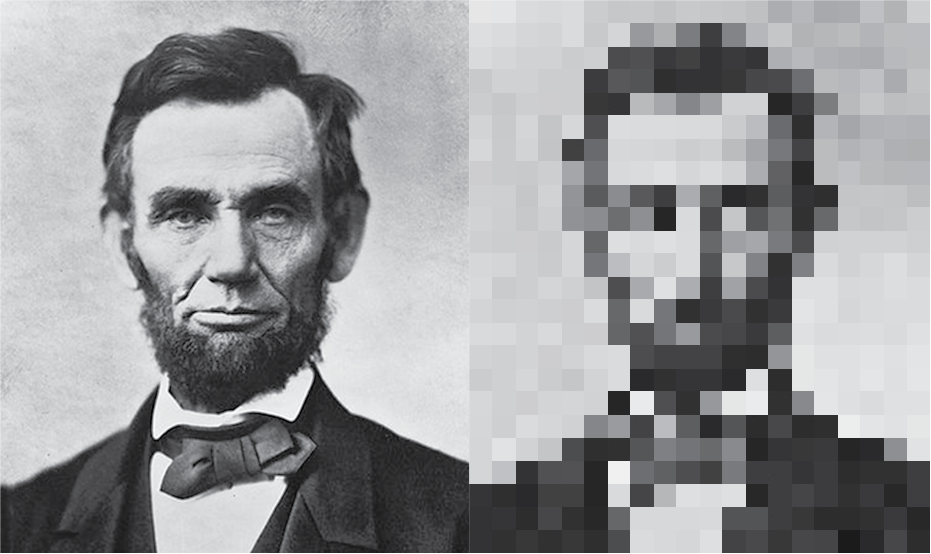\r\n\r\nNote that the low resolution version is three 8x8 “tiles” high. In other words, the largest possible images in the final mosaic will be approximately 1/3 of the mosaic height. This is a reasonable assumption, as we’re very unlikely to find a random library image that exactly matches more than a third of the target image.\r\n\r\nNext, we create the intervening resolutions. These resolutions are powers of two derived from the 8x8 image, up to 128x128. I.e., we have an 8x8 resolution image, as shown in Figure 6, a 16x16 resolution image which is four times the size of the 8x8 resolution image, a 32x32 resolution image which is four times the size of the 8x8 image, and so on, down to 128x128. 128x128 is the highest resolution we perform image registration on because higher resolutions do not produce meaningful refinements of scale and rotation and are therefore a waste of computation. The original library images (used to render the final mosaic) are 256x256 pixels.\r\n\r\nNote that while black and white images are used in this example, the same math applies to color. The same steps are simply applied to each color channel (R,G,B) in parallel.\r\n\r\n2. Perform Log-polar registration on each pixel\r\n\r\nSince Fractal Mosaics doesn’t perform “wrapping” of pixels on the boundary of the target image, we only evaluate pixels in the “valid pixel area” (red box in Figure 7).\r\n\r\n\r\n\r\nFor each location (x,y) in the valid pixel area, we perform the following steps:\r\n\r\n\r\n1. Crop 8x8 pixel portion of target image around pixel x,y. This is the “target tile” IT. Figure 8 shows an example crop, with the red pixel at x,y.\r\n\r\n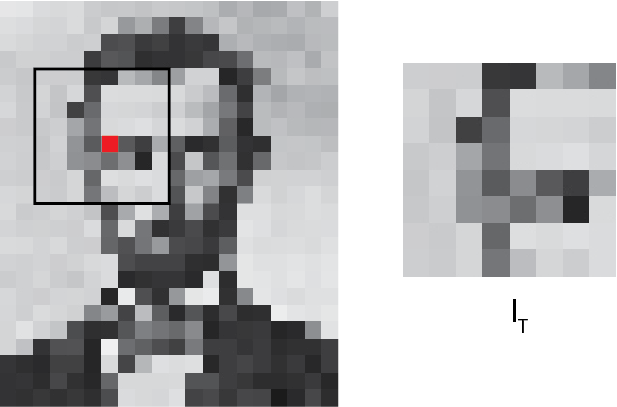\r\n\r\n\r\n2. Input target tile IT into image search module. The image search module returns a list of library images most statistically similar to the target tile. Details on this found in the Image Search section. The number of images returned is set via the ‘num_lib_test_pix_v’ parameter, as explained in the Variables page.\r\n\r\n3. For each library image returned by Step 2:\r\n\r\n1. Resize library image IL being evaluated to 8x8 pixels\r\n2. Take Log-polar transform of target tile IT and library image IL\r\n3. Compute cross-correlation of Log-polar transformed IT and IL\r\n4. Find maximum of cross-correlation and compute rotation and scale estimate from position of maximum.\r\n5. Rotate and scale library image by estimated scale and rotation.\r\n6. Compute rms error between scaled and rotated library image and target tile\r\n7. If rms error is below a threshold (i.e. good enough match), proceed to next resolution.\r\n\r\nIf the rotated and scaled 8x8 library image produces a low enough rms error, the above steps are repeated at the next resolution up, 16x16. Simply replace ‘8x8’ with ‘16x16’ in step 1 and the steps are identical. \r\n\r\nThere are now four 16x16 resolution pixels (locations) “under” our initial 8x8 pixel (x,y) that need to be evaluated. Each 16x16 location is evaluated the same way we evaluated the 8x8 location. Pixel locations that result in rms errors lower than a threshold are saved as “candidate pixels” to be evaluated at the next higher resolution. In this way, we repeat the same steps for each resolution, refining our position estimate at each stage. Figure 9 illustrates this process. The pixel locations in red are the candidate pixels at each resolution As can be seen, in this case, we eventually converge to a single 128x128 resolution pixel location. \r\n\r\n\r\n\r\nNote that for the first three resolutions (8x8, 16x16, 32x32), we let through up to four candidate pixels, if they’re below the rms threshold. At the 64x64 resolution, only one candidate pixel is chosen (the one with the lowest rms error). This is because at lower resolutions (especially 8x8 and 16x16), sometimes the location with the lowest rms error doesn’t correspond to final location estimate. After the 32x32 resolution however, the lowest rms error almost always converges to the correct location.\r\n\r\n## Levels\r\n\r\nThe steps described in the first two sections will produce a mosaic. However, the scale range of Log-polar registration restricts the size of images in the mosaic. In the paper outlining Log-polar registration (pdf), the authors claim up to 10X scale recovery. In this author’s experiments, scale was only recovered reliably up to 2X. This is due to the fact that we’re not registering images of the same objects/scene, but rather random library images. If we were doing traditional image registration, this would be equivalent to matching images with extreme warping/distortion. Therefore, using the image resolutions presented thus far, the smallest image in the mosaic would be the size of a target tile (1/3 of the mosaic size), scaled down by 1/2, or 1/6th the size of the target image. This means the “resolution” of the overall mosaic is low. We can only have relatively large matches (“tiles”), some of which may not match the target image very well. To create a “higher resolution” mosaic, one where smaller library images fill in target image details, we introduce higher “levels”. \r\n\r\nEssentially, at each level we repeat the same algorithm steps, but start with a higher resolution “lowest resolution” target. At level one (L1), we use the 8x8 “lowest resolution” target image, as illustrated in Figure 8. For level 2 (L2), we start with a 16x16 lowest resolution target image, as illustrated in Figure 10. This does not change the resolutions used in Log-polar registration. The 16x16 lowest resolution image is still treated as if it were created from 8x8 tiles. There are just more 8x8 tiles to evaluate now, and those tiles are smaller relative to the actual size of the overall mosaic. Again, we create higher resolution versions of the target image from the lowest resolution image (8x8, 16x16....down to 128x128). At higher levels, the reference target images are simply larger.\r\n\r\n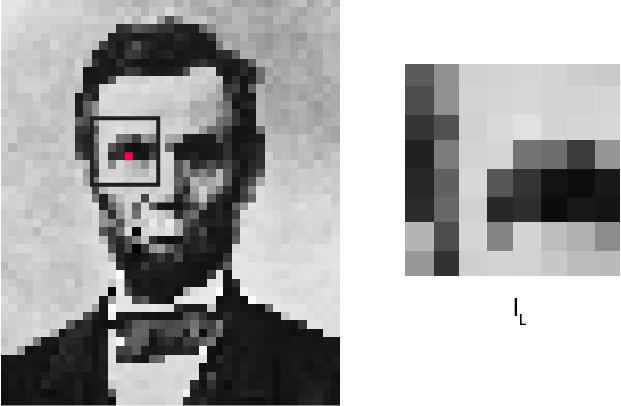\r\n\r\nFigure 11 shows another way to visualize levels. At level 1 (L1), the size of the 8x8 target “tiles” registered are the size of the entire image. At L2, the 8x8 images registered are 1/4th the size of the entire image. At L3, they are 1/16th. At L4, 1/32, etc., as illustrated by the nested squares. In all, there are eight levels. This allows Fractal Mosaics to place very small images, if desired (for more on how to control image size, see the Variables page).\r\n\r\n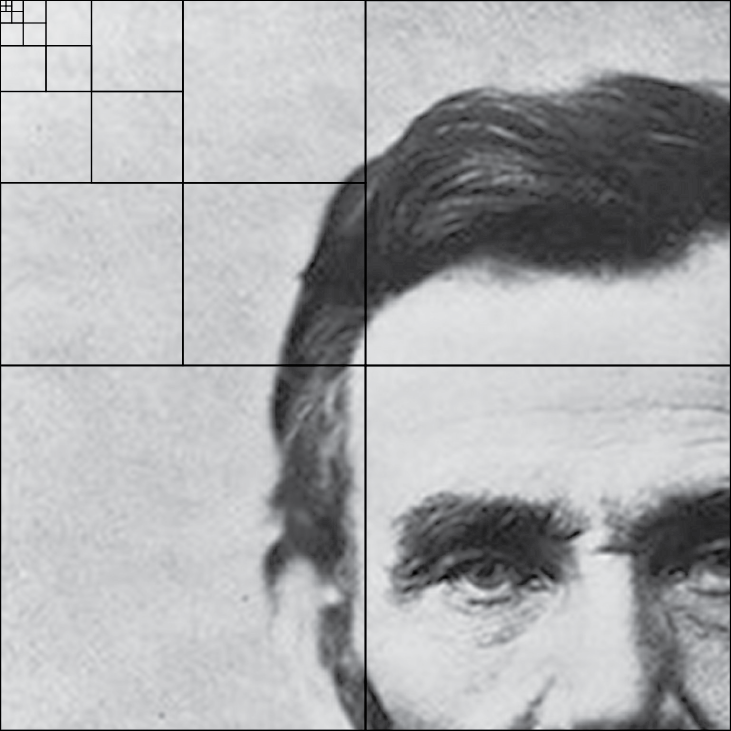\r\n\r\n## Error Thresholds\r\n\r\nThe error thresholds that determine if a library image gets passed to the next resolution are a function of level and resolution. These were determined empirically. At lower resolutions, the threshold is higher. This is because the rms error can fluctuate significantly between 8x8 and 128x128, and we don’t want to prematurely filter out good matches. All thresholds are calculated relative to a baseline value, stored in the ‘bias_floor’ variable. As explained in the Variables page, this is the main way to control the “resolution” of the overall mosaic. Raise the ‘bias_floor’, and Fractal Mosaics will permit larger matches, which may not match the target image as well. Lowering ‘bias_floor’ will create a mosaic with smaller images that more closely match the target image.\r\n","google":"","note":"Don't delete this file! It's used internally to help with page regeneration."} |